Related Posts Plugin for WordPress, Blogger...
Showing posts with label Mobile. Show all posts

Friday, 16 September 2011

How Android works: The big picture

Summary: Some parts of Android will be familiar, such as the Linux Kernel, OpenGL, and the SQL database. Others may be completely foreign, such as Android’s idea of the application life cycle. You’ll need a good understanding of these key concepts in order to write well-behaved Android applications. Let’s start off by taking a look at the overall system architecture–the key layers and components that make up the Android stack. Excerpted from an upcoming book.


Some parts of Android will be familiar, such as the Linux Kernel, OpenGL, and the SQL database. Others may be completely foreign, such as Android’s idea of the application life cycle. You’ll need a good understanding of these key concepts in order to write well-behaved Android applications.


Let’s start off by taking a look at the overall system architecture–the key layers and components that make up the Android stack. The following diagram (courtesy of Google) shows the “20,000 foot” view of Android:
How Android works: The big picture
Starting at the bottom is the Linux Kernel. Android uses Linux for its device drivers, memory management, process management, and networking. However you will never be programming to this layer directly.
The next level up contains the Android native libraries. They are all written in C/C++ internally, but you’ll be calling them through Java interfaces. In this layer you can find the Surface Manager (for compositing windows), 2D and 3D graphics, Media codecs (MPEG-4, H.264, MP3, etc.), the SQL database (SQLite), and a native web browser engine (WebKit).
Next is the Android runtime, including the Dalvik Virtual Machine. Dalvik runs dex files, which are coverted at compile time from standard class and jar files. Dex files are more compact and efficient than class files, an important consideration for the limited memory and battery powered devices that Android targets.
The core Java libraries are also part of the Android runtime. They are written in Java, as is everything above this layer. Here, Android provides a substantial subset of the Java 5 Standard Edition packages, including Collections, I/O, and so forth.
The next level up is the Application Framework layer. Parts of this toolkit are provided by Google, and parts are extensions or services that you write. The most important component of the framework is the Activity Manager, which manages the life cycle of applications and a common “back-stack” for user navigation.
Finally, the top layer is the Applications layer. Most of your code will live here, along side built-in applications such as the Phone and Web Browser.
One of the unique and powerful qualities of Android is that all applications have a level playing field. What I mean is that the applications Google writes have to go through the same public API that you use. You can even tell Android to make your application replace the standard applications if you like.
Read More

Tuesday, 23 August 2011

Difference Between Smartphone and Tablet and Laptop


Smartphone vs Tablet vs Laptop

Smartphone and Tablet and Laptop are the most popular mobile devices. Mobility is the buzzword these days and this is precisely why electronic gadgets are becoming smaller and lighter. Laptops were invented to give a person ability to take his computer along with him anywhere. Technology has been moving ahead at a fast pace, so much so that mobile devices with internet connectivity are crossing the boundary lines and performing similar, overlapping functions. This is especially true in the case of smartphone, tablet and a laptop. All three are portable and have internet connectivity. But each has its own distinct features and cannot take place of the other two. In this article, we will analyze the difference between smartphone and tablet and laptop highlighting their features so that any consumer can purchase one that is most suitable for his requirements.
Smartphone
Though a smartphone is basically a device made for calling and receiving calls, it has additional multimedia features and computing abilities to place it closer to a laptop. It can be thought of as a handheld mini computer as against simple phones, it makes use of an independent operating system to install and run advanced and complex applications. In this aspect, they are much more than a mere mobile phone and can work as a personal digital assistant. Some smartphones have a full QWERTY keypad that is physical resembling just like a laptop. However, most smartphones have a virtual keyboard that the user can operate easily with the help of a highly capacitive touchscreen.
Over 50 million people in US alone use smartphones indicating their extreme popularity. These phones have fast processors and large internal memory, big display screens (around 3.5”) and OS that are very user friendly giving a very pleasing experience to the users of these smartphones. Two OS that have dominated the smartphone market are Apple’s iOS and Google’s Android. While iOS is used by smartphones made by Apple only, Android is an open source OS used by nearly all the other manufacturers of smartphones.
Tablet
This is an innovation that looks like a large smartphone, but has additional capabilities to resemble more like a laptop. The only difference is that unlike laptop, it comes in the form of a slate instead of a briefcase like design of laptop where the keyboard is separate from the screen and two are hinged together. Tablet PC, as it is called makes available capabilities of an enriched multimedia device allowing the user to experience audio and video files on a bigger screen which is normally around 10 inches, just a little bit smaller than a laptop. As tablets make use of virtual keyboard, they are good for little typing work such as sending emails but for tedious jobs, laptops are obviously a better job.
All tablets are Wi-Fi, meaning they can be used to surf the web and they can be used to play games also. Today, tablets are coming equipped with dual camera both for capturing HD videos and to make video chatting and video calling possible. However, as there are compromises in hardware, the functions such as multimedia tasking and other complex operations are difficult to perform in tablets. Tablets prove to be a pleasing experience if the owner uses them as e-book readers.
Laptop
Of the three mobile devices, laptop is the most powerful when it comes to computing and also for browsing the net. The only drawback is the lack of 3G connectivity which is there in smartphones and tablets. However, for those on the move and also need to carry out complex tasks on their device, laptops are an ideal choice. Laptop has the fastest processor and also largest capacity of internal memory. A laptop is basically a PC that can be carried along at all places and integrates all the capabilities of a computer. Instead of a mouse the user has a touchpad and the speakers are inbuilt to make it a complete package. In addition, a laptop can be operated on a battery, and without power, it can run for 3-5 hours. With a display of 14” or more, a laptop is capable of performing all the tasks your computer theoretically can.
Summary
All three, smartphone, tablet and laptop is portable internet connected devices with different sets of features.
With passage of time, thin lines dividing them are getting blurred as smartphones and tablets are more powerful than before and coming closer to a laptop.
While smartphone and tablet have 3G connectivity, laptop lacks it.
Laptop is most superior when it comes to serious computing, while tablet provides enriching experience while enjoying multimedia files and playing games. Tablet is a very good e-book reader also.
While laptop can be upgraded, it is not possible in case of smartphone and tablet.

Read More

Friday, 19 August 2011

Imaginary phone lets you answer calls on your palm


Video: Never forget where your phone is again
Sean Gustafson unlocks his iPhone by swishing a finger across its screen and pecking out a four-digit PIN on its keypad. It's unremarkable save for one small thing: there is no phone in his hand. Instead, he's pressing invisible "buttons" on his palm – to operate an imaginary cellphone. And, astonishingly, it works.
Imagine you cannot find or use your phone when it starts ringing. Perhaps it's fallen into the depths of your sofa, or your hands are wet from washing up or greasy from baking. To decline the call and send it to your messaging service, you press the area of your palm corresponding to the position of the relevant button if you had the phone in your hand. Or you could press the buttons to answer the call and turn on the speakerphone.
The idea is certainly strange, but Gustafson and his colleagues Patrick Baudisch and Christian Holz at the Hasso Plattner Institute at Potsdam University in Germany think there is a gap in the market for phones and TV remotes like this that don't actually exist.
For it to work they reason you'd need two things: people who know precisely where the apps are on their physical phone, and a technology that can sense where they are pressing on their hand so a computer can respond and send commands to your phone – wherever it is.

From iPhone to iPalm

To find out how well people know their modern touchscreen phones, the Potsdam trio recruited 12 volunteers from among the iPhone users they spotted in their cafeteria and tested how well they knew the position of their favoured apps without their phone. "We found 68 per cent of iPhone users can locate the majority of their home screen apps on their hand. This means that iPhone use inadvertently prepares users for the use of an imaginary version," says Baudisch.
Having established a reasonable chance of successfully finding an app's position on someone's palm, they then decided to use "depth cameras" – similar to those at the heart of Microsoft's Kinect motion-sensing gaming system – to detect where someone is pressing on their palm.
The depth camera they used in their tests is a "time-of-flight" device that flashes an invisible infrared pattern on the scene and which uses ultrafast receiver circuitry to time how long it takes the light bathing different parts of the scene to be returned to a sensor. That way, it knows how far all the objects in the scene are from the camera – so when a users' finger presses on their palm, it registers where and when it does so. The signal is sent to a computer which processes it and then sends the relevant command to your cellphone.

Going 'all-imaginary'

In their tests, the depth camera was a clunky head mounted device. "But ultimately, we envision the camera becoming so small that it integrates into clothing, such as the button of a shirt, a brooch, or a pendant. So people would not even notice if someone carries an imaginary phone," Baudisch told New Scientist.
"We envision that users will initially use imaginary phones as a shortcut to operate the physical phones in their pockets. As users get more experienced, it might even become possible to leave the device at home and spend the day ‘all-imaginary'."
Answering calls on the phone would still require the physical device – but it would be possible to access apps and forward calls to voicemail with the imaginary version.
It's not all about phones, however: Gustafson is now working out how a TV remote control could be replaced by an imaginary zapper. The team hope to present their work at a conference on user interfaces later this year.
"For quite simple interactions this is probably going to work well," says Nick Bryan-Kinns of Queen Mary, University of London. "But for more complicated functions it's difficult to know how you'd do it without using audio feedback from the device, telling you which function you've activated."
Read More

Monday, 8 August 2011

What Should I Do if I Drop My Cell Phone in Water?

The small convenient size of cell phones unfortunately also makes these electronics accident-prone, especially when it comes to water. If you drop your cell phone in water it is often possible to salvage it, however, time is of the essence. If you drop your cell phone in water, you may have only seconds to retrieve it, so you need to act fast even if it means retrieving it from the toilet!

The next thing to do if you drop your cell phone in water is to remove the battery immediately without even hesitating to turn off the power. This reduces the risk of a short circuit which would render your phone useless. Dry the batter with a towel and set aside to dry thoroughly. The battery itself may or may not work again, but fortunately batteries can be replaced fairly inexpensively. Even if the battery does work, it is a good idea to get a new one so as not to risk it leaking battery acid in the future.
After you have removed the battery, dry off the cell phone with an absorbent towel as best as you can. Use cotton swabs to soak up water in crevices and on any fragile, exposed circuits. If you have dropped your cell phone in water, it is also helpful to disassemble it if you can and let all the parts dry separately. Just be sure that you know how to put it back together. If it is a flip or sliding cell phone, leave it open for maximum evaporation.
If you drop your cell phone in water that isn’t pure such as a beverage or in salt water, rinse the phone off with fresh water once you have removed the battery. Once you drop the phone in water, the additional rinsing will not do further damage, however, minerals or other materials will.
If you drop your cell phone in liquid that isn’t pure water, you may want to try giving it an alcohol bath. The alcohol will displace minerals and microscopic substances as well as aiding in the evaporation of the fluid. If it is available, you should use an alcohol concentration of 95% rather than rubbing alcohol that usually contains only 70%.
Once your phone is clean, leave it in a warm dry area or near an air conditioner for three days before you attempt to replace the battery and turn it on. This is very important, because although you may think that you have thoroughly dried it, the slightest moisture can react with the battery and cause it to short circuit. If drop your cell phone in water, and want to save it, resist the temptation of turning it on to see if it is working until you have waited at least 72 hours.
Unless you have insurance for your cell phone which covers water damage, there is no point in sending it to the manufacture with the hope that they will replace it under warranty. If you drop your cell phone in water, the technicians will be able to tell immediately due to moisture sensitive stickers that are contained inside almost all cell phones. The best thing to do is to try the tips mentioned above and repair it yourself.
Read More

Thursday, 4 August 2011

Skype 2.1 for Android enables video on majority of Android devices


Skype promised to add support for additional handsets when they launched their new Skype for Android app with video a couple of weeks ago. Today skype pleased to announce that with the release of Skype 2.1 for Android, we are rolling out video support for an additional 17 of the most popular Android devices. Download the updated Skype for Android app from the Android Market or Skype.com/m using your Android phone's browser or just scan the QR code below.
The list of Android devices we've added Skype video support for include:
  • Acer A5
  • HTC Desire (2.2)
  • HTC Desire HD
  • HTC Evo 3D
  • HTC Evo 4G
  • HTC Flyer
  • HTC Incredible S
  • HTC Sensation
  • HTC Thunderbolt - Verizon (2.2) (US only)
  • LG Revolution - Verizon (2.2) (US only)
  • Samsung Droid Charge - Verizon (2.2) (US only)
  • Samsung Galaxy S
  • Samsung Galaxy S II
  • Samsung Galaxy Tab
  • Sony Ericsson Xperia mini pro 2
  • Sony Ericsson Xperia PLAY
  • Sony Ericsson Xperia ray

Is your device not on the list? No need to worry...
For those of you using Android 2.2 (Froyo) and above, you should still be able to enable video calling in your Skype settings. Just go to "Skype settings" after launching the app and select "enable video calling".
Unfortunately, if you cannot see the video calling settings, it means your Android phone does not meet the minimum requirements needed to make Skype video calls. Please be aware that video call quality may not be as good as on a certified Android device and only the back camera of the device will work if your device is running on Android 2.2 (Froyo).

In addition, the Skype 2.1 for Android update includes a number of bug fixes and performance enhancements, which should further boost the user experience of Skype for Android on your phone.
We are really excited that video calling with Skype for Android with video calling is now available on the majority of Android handsets, so you can easily share moments wherever you are with the people that matter most to you.
QR code Android 2.1.png
Read More

Wednesday, 29 June 2011

NFC-enabled 'smart' car key will connect to your portable gadgets


NFC-enabled 'smart' car key technology has been launched by The Netherlands' NXP Semicondu...
Near Field Communication (NFC) was initially promoted as a mobile payments method, but the technology has since been applied to a broader range of applications - and the list is still growing. One of these is a new system allowing for NFC implementation in a car key, which has been launched by the Dutch company NXP Semiconductors. The system is a production-ready single-chip solution dubbed KEyLink Lite (codenamed NCF2970) that enables a connection between a "smart" car key and external NFC-compliant devices, such as mobile phones, tablets and laptops.
NFC is a short-range (up to 20 cm/8 inches) standard of radio communication between electronic devices, so far mainly used in smartphones (such as the Nokia C7 and Google Nexus S). Combining NXP's existing car key security technologies, cryptography technology, and an NFC system operating at 13.56MHz frequency, KEyLink Lite will allow users to access sensitive car data by simply waving the key near an NFC-enabled device.
Some of the KEyLink Lite features would include:

Car Finder

The key will record GPS coordinates (presumably connecting to the in-car navigation system) of the car's current parking location, allowing users to locate their vehicle with the use of a mobile phone and online maps.

Route Planner

This proposed function will allow drivers to plan their route at home, transfer the details to the key, and then upload them from key to the in-car navigation system.

Car Status and Service Data Management

There will be no need to remember the fuel level or keep the car service history on paper any more. All of this information can be stored on the key, and transferred to a laptop or smartphone when needed.

Car Self-Diagnosis

Diagnostic data can be transferred from the car to a PC via the key, and then uploaded to a diagnostic website for analysis.

Car Personalization

Car manufacturers could offer some additional, exclusive features in their vehicles and provide clients with the possibility of unlocking them with the use of the key.
NXP developed a multi-functional Smart Key prototype with BMW in the past, which was supposed to work as a method for mobile payments. The Dutch company, however, does not mention such an application for the current device.
The KEyLink Lite technology is now available for production. There is no word yet on which car manufacturer may actually use it, or when.
Sorce: Gizmag.com
Read More

Monday, 13 June 2011

Five Must-have Android Security Apps


Android is on its way to become the first-love of thousands of smartphones users across the world.
It has already outdone Symbian and Apple iOS doesn't seem to be offering a tough challenge. While it is a terrific OS in more than one ways, it also has many security concerns. Users across the globe have been perturbed by the fact that Google removed at least 50 malware-infected applications and activate an Android app kill switch. But keep your worries aside because there are several third-party security apps available for Android and these apps are doing fairly good job.
Read More

Thursday, 12 May 2011

Mobile phones could be charged by the power of speech

For mobile phone users, a flat battery or a lost charger are among the frustrations of modern life.

Now new research promises a way to recharge phones using nothing but the power of the human voice.

Electrical engineers have developed a new technique for turning sound into electricity, allowing a mobile to be powered up while its user holds a conversation.

The technology would also be able to harness background noise and even music to charge a phone while it is not in use.

However, there could be a downside to the innovation, if it gives people a new reason to shout into their phones as they attempt to squeeze in every extra bit of power they can.

Dr Sang-Woo Kim, who has been developing the design at the institute of nanotechnology at Sungkyunkwan University in Seoul, South Korea, said: "A number of approaches for scavenging energy from environments have been intensively explored.

"The sound that always exists in our everyday life and environments has been overlooked as a source. This motivated us to realise power generation by turning sound energy from speech, music or noise into electrical power.

"Sound power can be used for various novel applications including cellular phones that can be charged during conversations and sound-insulating walls near highways that generate electricity from the sound of passing vehicles.

"The latter development would have the additional benefit of reducing noise levels near highways by absorbing the sound energy of vehicles."

The technology uses tiny strands of zinc oxide sandwiched between two electrodes. A sound absorbing pad on top vibrates when sound waves hit it, causing the tiny zinc oxide wires to compress and release. This movement generates an electrical current that can then be used to charge a battery.

A prototype of the technology was able to convert sound of around 100 decibels - the equivalent of noisy traffic - to generate 50 millivolts of electricity.

"This is not enough to charge a phone properly, but Dr Kim and his colleagues hope that by altering the material the wires are made from they will be able to produce more energy at lower sounds levels.

He said: "Our current output performance can be applied to various electronic devices with low-power consumption such as self-powered sensors and body-implantable tiny devices. We believe that we can realise more efficient sound-driven nanogenerators."

Researchers and some manufacturers have already started looking at using 'energy scavenging' as a way of powering portable electronic devices.

Scientists have developed devices that can use the heartbeat to power MP3 players, while Nokia has filed a patent for a device which harvests energy from movement, much like a kinetic energy powered watch.

For more information:http://www.telegraph.co.uk/technology/news/8500161/Mobile-phones-could-be-charged-by-the-power-of-speech.html
Read More

Wednesday, 27 April 2011

Inductive charging: Charge Cellphone Wirelessly Through Magnetic Induction


Practically everyone owning a mobile knows that it is important to recharge the battery of the mobile every now and then. Many a times, you may have in fact been jolted from sleep because of the beeping of a weak mobile phone battery. Charging mobile phones may prove to be a hassle to many people with the cables that have to be carried wherever you go, and having to remember to charge the mobile on time.

Forget plugging your charger to a socket. Scientists at the Massachusetts Institute of Technology (MIT) have developed remote charging using magnetic induction between two devices that resonate with one another. Objects that resonate on the same frequency send energy from each other, a phenomenon called “strong coupling.”

Inductive charging uses the electromagnetic field to transfer energy between two objects. A charging station sends energy through inductive coupling to an electrical device, which stores the energy in the batteries. Because there is a small gap between the two coils, inductive charging is one kind of short-distance wireless energy transfer.

The other kind of charging, direct wired contact (also known as conductive charging or direct coupling) requires direct electrical contact between the batteries and the charger. Conductive charging is achieved by connecting a device to a power source with plug-in wires, such as a docking station, or by moving batteries from a device to charger.

Induction chargers typically use an induction coil to create an alternating electromagnetic field from within a charging base station, and a second induction coil in the portable device takes power from the electromagnetic field and converts it back into electrical current to charge the battery. The two induction coils in proximity combine to form an electrical transformer.

Greater distances can be achieved when the inductive charging system uses resonant inductive coupling.

Source:Wikipedia
Read More

Monday, 25 April 2011

How to disable a STOLEN mobile phone?

How to disable a STOLEN mobile phone?


To check your Mobile phone's serial number, key in the following digits on your phone:

* # 0 6 #
A 15 digit code will appear on the screen. This number is unique to your handset. Write it down and keep it somewhere safe.

Should your phone get stolen, you can phone your service provider and give them this code.They will then be able to block your handset so even if the thief changes the SIM card, your phone will be totally useless
Read More

Wednesday, 20 April 2011

How to Counter Bad Effects of Mobile Phone Radiation

Mobile phones have become an integral part of our lives. It's hard to even imagine a life without mobile phones, let alone actually live without them.

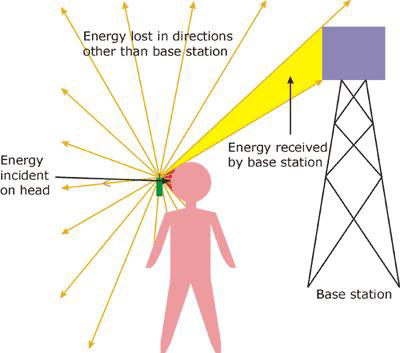
While there are plenty of benefits attached with mobile phones, negative effects associated with them have also started surfacing. According to a recent study carried out in the United States, radio waves emitted from mobile phones and mobile phones towers can lead to disorders like insomnia, vertigo, lack of concentration etc. in humans. This can further develop into reduction in response-time, memory loss, acute headache, acute indigestion, and cardiac arrest as well.

Here a list of few easy-to-follow steps which can help counter the bad effects of mobile phone radiation:

Use Handsfree: This helps maintain a distance between the handset and your ears which in turn reduces the harmful effects of radiations.
Adequate Distance from the Body: While talking, don't glue your mobile phone to your ear. Proximity of mobile to the body parts can amplify the harmful effects of radiation. It can also lead to neck-ache and pain in the ear.
Do not Keep the phone under your pillow: It is a dangerous practice to keep your cellphone tucked under your pillow while sleeping. The waves emanating from mobile phones can cause severe headache and can lead to other disorders in the long run.

Switching off your Mobile: If possible, try and switch off your mobile while driving. If you are in an area where signal strength is poor, it's advisable to turn off your handset. This is because electromagnetic radiation augmented if the reception is poor.
Prefer SMS over Calls: Resort to texting for your various communication needs rather than making calls at the slightest pretext
Read More

Thursday, 14 April 2011

Why use a solar phone charger?

Most everyone nowadays carries around a cell phone. There are many people that often forget to charge their cell phones especially if they are busy with work and other duties solar phone chargerthroughout the day. A solar mobile phone charger would be the right companion for your cell phone if you are the type of person that is busy throughout the day or if you tend to forget to charge your phone.

A solar mobile charger is handy because you can take it anywhere you go without the need of having to plug it in to any type of outlet. All you need is access to the sun (which is plentiful and available), and you’re set! There is no more worrying about where you will be able to find a plug to charge your cell phone. So why should you purchase a solar cell phone charger? Simple, because it will save you time, save you money, and it is convenient to use! Who wouldn’t want those benefits?

If you’re new to knowing about solar cell phone charger then you might be interested in knowing where you can find them at. This invention has not been around for too long, but long enough to where it is not very hard to find. In fact, you can find many online stores and even advertisements that promote solar cell phone chargers. Just to get you a head start you should head on over to this products page where you will be presented with various options of portable cell phone chargers to choose from.

My Solar Phone Charger is a directing website that will give you a list of available solar phone chargers that you can buy on the web. You will also find some other accessories to go along with your portable mobile phone charger as well.

Solar cell phone chargers are simply the best next invention for your cell phones and more people are beginning to switch over to use them. Depending on which one you purchase, there are some larger solar chargers that can charger more than one mobile phone at once. If you are just curious and interested in trying a solar portable phone charger out, you should be prepared to at least pay about $50; that is about how much the cheapest one will cost. It is definitely worth the investment to purchase one!
Read More

Tuesday, 29 March 2011

What Does 3G Mean?

Nowadays, everybody has a mobile phone. Whether they're on a contract or a pay as you go tariff, the mobile phone has become an essential item for many people. this article will be taking a look at the the mobile phone's history - as well as its future - in order to find out more about the now essential telecommunications device.

Mobile phones started life as the two way radio, which was also called mobile rigs. these were installed in vehicles such as minicabs, police cars and ambulances, but were not strictly mobile phones as they were not normally connected to the telephone network. while the very first mobile phones were installed permanently in vehicles, later versions such as the transportables, also called bag phones, could also be carried, and can be used as either portable or as mobile two-way radios.

The first generation of mobile phones are often called 1G. These mobile phones are the analog devices that were introduced in the eighties & continued until being replaced by 2G mobile phones, which ran on digital networks. in fact, even though 1G & 2G systems use digital signals to connect the radio towers to the rest of the telephone network, the voice itself during a phone call encoded to digital signals in 2g while voices on 1G phones aren't.

Second generation, also called 2-g, mobile telephones were introduced in the nineties. 2-g phone systems were characterised by their use of digital transmission and the introduction of advanced and fast phone to network signalling.

The birth of 2-g systems saw telephones move from friendly 1g telephones to little handheld items, which were much more portable. this change was possible through technological developments including more advanced batteries and energy saving electronics.

The second generation mobile telephones had severaladvantages over 1g items. These included text messaging, which became possible on gsm networks initially and eventually on all digital networks. the earliest machine-sent message was sent in 1991 in the uk. the earliest person to person sms text message was sent in 1993 in finland. sms text messaging soon became the preferred method of communication and the public now prefer sending text messages to placing voice calls.

3-g is the term applied to the third generation of mobile phone standards & technology. 3g follows 2g mobile phone technology.

The birth of 3-g technologies allow network operators for instance Vodafone give their users a larger range of more advanced services. These include video calls& wireless internet.

Even though 3-g was successfully introduced throughout the world, issues have been raised by both 3-g providers & users, comprising of costly phones. in addition to this, there's numerous differences in the licensing terms.

Ever since the launch of 3-g mobile phone technology. people have been talking about 4g. 4g technology will signify the future of mobile telephones, creating the most sophisticated handsets and best services yet. in actual fact, one of the next services to be developed is thought to be live streaming of radio and tv shows to 3-g handsets is and shops including real and disney recently announcing that they'll be offering services like these.

In conclusion, even though the history of mobile phones they have come a long way in the past few years, it also indicates that they'll go even further still.
Read More

Monday, 28 March 2011

GSM codes

Most, if not all, of the commands described here are accessible via the menu of your cellphone. But what happens if you're using a new phone that you don't quite have at your fingertips, or a borrowed phone while yours is in for repairs? What happens if you need the information now but don't have the time to go delving into the manual? Always assuming you have the manual…

Barring restrictions put in place by your cellphone operator, the GSM codes described here should work on any GSM phone. Or, put in other words, if any of the network operations described below fail, it is because your operator doesn't implement them correctly, if at all.

There are very few concepts to learn, and once they are learned you'll be able to access information and perform network settings regardless of the phone you're using and how well (or how little little...) you know its menus.

SERIAL NUMBER

You should make a note of your phone's serial number, or IMEI number and keep it in a safe place. In the event of you losing the phone or it being stolen, you'll need to have it deactivated so that whoever now has it cannot run up a huge bill for you. For this, you'll need to give your operator the phone's IMEI number.

With the phone in standby, key this on its keypad:

*#06#

FIRMWARE VERSION

NB: This code is specific to Nokia phones.

As new features are added to phones, you can have your phone updated to include them. This usually entails taking the phone to an authorized dealer, where they will either perform the firmware upgrade for you on the premises or send the phone off to a service centre for this to be done. More recent phones can often be updated by the user or "OTA" (Over The Air) via wireless transfer. If the phone is still under warranty then the manufacturer will usually perform the update free of charge. If the user bricks the phone by screwing up the update at home, this tends to void the warranty.

Note that the ability to upgrade your phone's firmware is also dependant on your operator. Most operators install customised firmware into the handsets that they provide, so you might have to wait for them to provide updated versions of their firmware when the phone's manufacturer has already released new firmware for unbranded phones.

This code (only on a Nokia phone) will reveal the date and version of the firmware currently installed in the phone:

*#0000#

CHANGE PIN CODE

You can change the PIN code used to protect your SIM from unauthorized use with the following sequence:

**04*OLD_PIN*NEW_PIN*NEW_PIN#

Eg.: assuming your current PIN is 1234 and you want to make it 5678, you'd use this:

**04*1234*5678*5678#

Note that some phones (my Motorola RAZR V3 for one) intercept this sequence and display windows asking you to input the old and new PINs as soon as they see the **04* sequence.

WIRELESS CONNECTIVITY

Many handsets have BlueTooth connectivity built in so that the user can use wireless earpieces, in-car kits and the like. Some also have on-board 802.11b/g wireless network connectivity. The following two key sequences, which are specific to Symbian S60 phones such as the Nokia N95, allow the user to get information about these types of connectivity.

BlueTooth BD address

This will show you the BD address of your phone's built-in BlueTooth adapter:

*#2820# (*#bta0#)

WLAN MAC address

This code will show you the MAC address of the built-in WiFi adapter. It can be useful if, for example, you need to add it to your wireless router's "allow" table so you can access the Internet over your your WLAN:

*#62209526# (*#mac wlan#)

SYSTEM RESET

In the event of your phone becoming unstable (crashing, rebooting of its own accord, switching off for no apparent reason etc.), it can be beneficial to perform a system reset. Note that these procedures will erase the built-in memory of your phone (but not the contents of a memory card in the expansion slot), so make a backup of the contents before proceeding − either onto a memory card if you have one and if your phone allows this feature, or to your computer using software provided with your phone. Also ensure that your battery is fully charged.

Note that these codes are also specific to Nokia phones. The "Restore factory defaults" code works both on S60 and earlier S40 phones while the "Soft reset" and "Hard reset" functions only work with phones that are S60 2nd edition and later.

Restore Factory Defaults

Dial this to erase all user settings and revert to factory defaults:

*#7780# (*#rst0#)

Soft Reset

If the above didn't restore stability to your phone then maybe it's necessary to clean deeper into its innards. The next step is the "Soft reset":

*#7370# (*#res0#)

You will be prompted for the phone's "security code" when attempting to revert to factory defaults or perform a soft reset. The default security code on all Nokia handsets is 12345. If you have forgotten it then the only option you have is the hard reset, which wipes everything in the phone.

If you have a phone on which the hard reset cannot be performed by the end user, you will have to take it into an authorized dealer for them to do it. They will want proof that you own the phone before wiping it for you (a copy of the invoice with your name and the phone's IMEI number printed on it should be good).

Hard Reset

The final thing to try if neither the revert to factory defaults nor the soft reset put things right is the hard reset. Your fingers are going to have to do a bit of gymnastics here.

Power the phone off.
Press and hold down the '3', '*' and green 'call' keys ('multimedia', '*' and 'call' for the N78, or red, green and camera keys for a 5800 XpressMusic running firmware V20 or later - the operation is not possible on firmware V10 or V11).
While maintaining these 3 keys down, switch the phone on.
Wait until the phone shows signs of life such as the manufacturer's logo or a language selection screen.
Release the 3 keys.

NETWORK OPERATIONS

Note that the codes given so far are not really GSM codes as such in that they don't allow you to interact with the GSM network. The codes *#06# and **04* are, however, standard across all GSM phones. While the operations described above complete automatically as soon as you type the final "#", network operations require you to send in to the operator the GSM code you've typed. Usually, this is achieved by pressing the key you normally use to dial a number − most of the time it's a green key. So, while it isn't mentioned explicitly, there is an implicit "send" or "dial" after each of the commands below.

Caller Line ID (CLI)

To find out whether your operator's default behaviour is to send your CLI when you place calls or to conceal it, you can interrogate the network with this GSM code:

*#31#

The network's default behaviour can be overridden on a per-call basis. In order to conceal your number when placing a call, you prefix the number you want to dial with #31#. So, for example, if you want to call 0123.456.7890 without revealing your number, you'd dial:

#31#01234567890

Conversely, if your network's default is to conceal CLI but you want your correspondent to see your CLI regardless, you prefix the number you're dialling with *31#. Thus, to force CLI to be sent while dialling the number above, you'd dial:

*31#01234567890

Call Waiting

Some operators provide the user with a call waiting function. Using this facility, you can have two people on the line and switch between them (but not speak to both simultaneously). This function, if supported by your line, can be interrogated and set using GSM codes. First, find out if it is active on your line with this code:

*#43#

If you get an error message in return, such as "not supported" or "undefined result", then call waiting is not supported by your line. Otherwise, you will be told whether the service is active or not.

In order to activate the service (if your line supports it), use this code:

*43#

In order to deactivate it:

#43#

Call Divert

The GSM standard knows two kinds of call divert:

Unconditional call divert
Conditional call divert

Conditional call divert occurs on any of three conditions:

Divert if no answer after 'x' seconds
Divert if unavailable (cellphone switched off or out of range)
Divert if line busy

Furthermore, the GSM standard knows three different types of call:

Voice call: normal communications when you pick up the phone to talk to someone.
Fax calls: the GSM terminal being called is a fax machine.
Data calls: your cellphone is acting as a modem hooked up to a computer accepting inbound data from elsewhere.

Each call type is assigned a number: 11 for voice calls, 13 for fax calls, 25 for data calls.

» Unconditional Call Divert

Unconditional call divert of all call types is achieved using this GSM code:

**21*target_number#

Eg.: to divert all inbound calls to 0123.456.7890 unconditionally, use this code:

**21*0123456789#

To cancel the unconditional call divert of all call types, use this code:

##21#

To find out if unconditional call divert is set up on your line, use:

*#21#

This will inform you of the unconditional call divert status of all the types of call supported by your handset.

Of course, it is also possible to divert unconditionally only calls of a particular type. This is achieved with GSM codes of the following format:

**21*target_number*CT#

…where "CT" is the 2-digit number for the call type you want to divert. So, for example, if I only want to divert fax calls unconditionally to my home fax number, which is 0987.654.3210, while still receiving voice and data calls on my cellphone, I'd use this code:

**21*09876543210*13#

Unconditional call divert status for individual call types can also be obtained from the network:

*#21*CT#

Eg.: is there an unconditional call divert set up for voice calls?

*#21*11#

Finally, unconditional call divert can also be cancelled for individual call types:

##21*CT#

Eg.: to cancel the unconditional call divert of fax calls set up above:

##21*13#

Recap:

*#21# : Interrogate unconditional call divert, all call types
*#21*11# : Interrogate unconditional call divert, voice calls
*#21*13# : Interrogate unconditional call divert, fax calls
*#21*25# : Interrogate unconditional call divert, data calls

**21*number# : Activate unconditional call divert, all call types, to number
**21*number*11# : Activate unconditional call divert, voice calls, to number
**21*number*13# : Activate unconditional call divert, fax calls, to number
**21*number*25# : Activate unconditional call divert, data calls, to number

##21# : Cancel unconditional call divert, all call types
##21*11# : Cancel unconditional call divert, voice calls
##21*13# : Cancel unconditional call divert, fax calls
##21*25# : Cancel unconditional call divert, data calls

» Conditional Call Divert: Call Divert if no answer

Under normal circumstances, if your phone rings for 20 seconds and you don't pick it up, the inbound call is diverted to your voicemail so that the caller can leave a message. You can change this default behaviour and have the call forwarded to another line, such as your land line or another cellphone. In order to do so, use this code:

**61*number*tt#

…where "tt" is the number of seconds you want your phone to ring before the call is diverted to "number". Possible values for "tt" are 05, 10, 15, 20, 25, 30.

The status of the conditional call divert if no answer can be obtained from the network:

*#61#

Conditional call divert if no answer can be cleared with this code:

##61#

Note that the usual effect of clearing the conditional call divert if no answer is not to make your phone ring forever if someone calls. It resets to the default setting of diverting to your voicemail after 20 seconds.

The above codes apply to all call types. It is also possible to have the conditional call divert if no answer apply to only one type of call, in which case they become of this form:

*#61*CT# : Interrogate conditional call divert if no answer for call type CT
**61*number*CT*tt# : Activate conditional CT call divert to number if no answer after tt seconds
##61*CT# : Cancel conditional call divert if no answer for call type CT

Recap:

*#61# : Interrogate conditional call divert if no answer, all call types
*#61*11# : Interrogate conditional call divert if no answer, voice calls
*#61*13# : Interrogate conditional call divert if no answer, fax calls
*#61*25# : Interrogate conditional call divert if no answer, data calls

**61*number*tt# : Conditional divert all calls to number if no answer after tt seconds
**61*number*11*tt# : Conditional divert voice calls to number if no answer after tt seconds
**61*number*13*tt# : Conditional divert fax calls to number if no answer after tt seconds
**61*number*25*tt# : Conditional divert data calls to number if no answer after tt seconds

##61# : Cancel conditional call divert if no answer, all call types
##61*11# : Cancel conditional call divert if no answer, voice calls
##61*13# : Cancel conditional call divert if no answer, fax calls
##61*25# : Cancel conditional call divert if no answer, data calls

» Conditional Call Divert: Call Divert if unavailable

Normally, if your cellphone is switched off or out of range, any inbound calls are diverted straight to your voicemail. You can change this so that calls get routed to a different number if your cellphone is unavailable.

You use a GSM code like this to activate conditional call divert if unavailable:

**62*number#

You can cancel the conditional call divert if unavailable with this code:

##62#

Finally, you can interrogate the network for the status of your conditional call divert if unavailable with this code:

*#62#

As for unconditional call divert and conditional call divert if no answer, you can also have the conditional call divert if unavailable apply only to one kind of call. You end up with these codes:

*#62# : Interrogate conditional call divert if unavailable, all call types
*#62*11# : Interrogate conditional call divert if unavailable, voice calls
*#62*13# : Interrogate conditional call divert if unavailable, fax calls
*#62*25# : Interrogate conditional call divert if unavailable, data calls

**62*number# : Conditional divert all calls to number if unavailable
**62*number*11# : Conditional divert voice calls to number if unavailable
**62*number*13# : Conditional divert fax calls to number if unavailable
**62*number*25# : Conditional divert data calls to number if unavailable

##62# : Cancel conditional call divert if unavailable, all call types
##62*11# : Cancel conditional call divert if unavailable, voice calls
##62*13# : Cancel conditional call divert if unavailable, fax calls
##62*25# : Cancel conditional call divert if unavailable, data calls

» Conditional Call Divert: Call Divert if busy

If you have call waiting and if it is activated, then your line will become "busy" once you have two correspondents on the line. If you don't have call waiting on your line, or if you do but haven't activated it, then your line will be busy with only one conversation under way. If another person tries to call you while your line is busy, the inbound call is usually shunted straight off to your voicemail so that the caller can leave you a message. This behaviour can be altered so that an inbound call received while your line is already busy gets diverted elsewhere.

The codes are identical to those for unconditional divert and for conditional divert if unavailable, except that the number 67 is used in place of 21 or 62 respectively. So, we end up with this:

*#67# : Interrogate conditional call divert if busy, all call types
*#67*11# : Interrogate conditional call divert if busy, voice calls
*#67*13# : Interrogate conditional call divert if busy, fax calls
*#67*25# : Interrogate conditional call divert if busy, data calls

**67*number# : Conditional divert all calls to number if busy
**67*number*11# : Conditional divert voice calls to number if busy
**67*number*13# : Conditional divert fax calls to number if busy
**67*number*25# : Conditional divert data calls to number if busy

##67# : Cancel conditional call divert if busy, all call types
##67*11# : Cancel conditional call divert if busy, voice calls
##67*13# : Cancel conditional call divert if busy, fax calls
##67*25# : Cancel conditional call divert if busy, data calls
Read More

Thursday, 24 March 2011

Ten Easy Ways To Extend The Life Of Your Mobile Battery

And there it goes again, just when you wanted to say something really important, your phone dies on you.

It has happened once to almost everyone with a mobile phone, and there have been discussion galore on how to save battery and make it last longer.

And here are some points to help you combat power loss:

1. Turn of anything and everything that makes sounds within your phone.

2. Most Mobile Phones have the energy saving or Battery Saving Setting, Use it!

3. It's time to take off that animated wall paper off, it eats up your batter like none other.

4. Just like your laptop, turning down the screen brightness for your mobile helps as well.

5. Have a look at your Backlight setting, do you really need it to stay for longer than ten seconds? You can actually turn of the backlight, if you can make use of the light of the place you are in.

6. Turn Off Bluetooth- Most of the time, people tend to switch of Bluetooth, and it's a major battery power eater.

7. Don't have the vibrate and ring option at the same time. It's advicable to have neither.

8. Don't overcharge your phone, the extra heat can harm your battery's performance.

9. Avoid fiddling with it, don't use unnecessary applications.

10. Switch off your phone when you're not using it, this really helps to prolong the life of the battery.

Hope this helps, have a healthy battery!
Read More